|
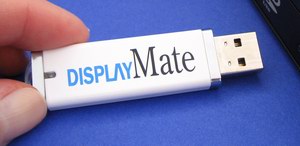
Just plug any DisplayMate Portable USB Edition
into any Windows PC and DisplayMate will launch automatically
and generate a complete set of DisplayMate's famous proprietary test patterns
with expert advice and guidance for monitor, projector and HDTV
set up, calibration, check up, testing, evaluation, and optimization.

|
|
|
These Enhanced Special Portable Editions come on a
tiny custom DisplayMate USB Thumb Drive and
run automatically without any installation procedure.
They are designed specifically for running from a custom DisplayMate USB Drive
and include a special enhanced user interface.
|
|
|
Extremely portable.
Great for end users with more than one PC
or who want to take it to a friend's house to calibrate their HDTV.
Great for Techs calibrating monitors, projectors and HDTVs
directly from their client's PCs in addition to their own Laptops,
as well as company IS departments
that support large numbers of PCs, monitors and projectors.
|
|
|
Nothing is copied or written to any drive on a PC,
so it's easy to use and won't leave anything behind
on the computers that you run it on.
As a result the USB Editions are perfect for using on client's or friend's PCs
because they don't modify or tamper with the computer's
Operating System, File System, or Window's Registry.
|
|
|
The DisplayMate USB Drives have about 2GB of extra storage space
that you can use for other applications.
DisplayMate USB Editions run in
XP Mode
on 64-bit Windows 7 systems.
DisplayMate USB Editions run on Apple Macs, Linux, Unix Workstations
using these
Emulators
|
USB Editions Support:
Automatic Launch:
Windows 7, Windows Vista and Windows XP
One Click to Launch:
Windows Me and Windows 2000
Read these Outstanding Reviews for the DisplayMate on USB Editions:

|
"We've tested DisplayMate Multimedia on USB and we loved it!
It's the best DisplayMate ever made and it's totally portable.
This is absolutely a must for any AV Tech's tool box!"
Gary Kayye, Publisher of the Audio Video
rAVe Newsletters
|

|
"The new USB based DisplayMate is a superb tool for the commercial and
home theater calibration technician that is portable, affordable,
and best of all accurate. Well done!"
Alan C. Brawn, Director of
ISF Commercial
|

|
"If you strive for perfection, use the same software that the manufacturers
use to adjust their TV sets: DisplayMate.
DisplayMate tests your TV's performance in many different areas and makes it
easy to optimize settings that will deliver the best possible picture."
|
Getting the Best Picture on Your HDTV - Your Digital Living Room, Special Section, January 7, 2008

|
"DisplayMate on USB is the easiest version of DisplayMate that I've ever
worked with. The USB Drive is a great convenience."
Alfred Poor,
HDTV Resource Center
|

|
"A premier test suite for both home and professional use,
DisplayMate has always been a superb and effective tool.
The new DisplayMate USB version is even easier to use.
The Multimedia on USB Edition is
particularly useful for technicians evaluating a customer's PC
or for IT departments that need to support a large number of PCs,
with numerous innovative suites of proprietary DisplayMate test patterns."
Highly Recommended
Ron LaFon,
Cadalyst Magazine
|

|
"For over 15 years, I have relied on DisplayMate as a key part of the tests
I have done on any display, as a brand owner and marketeer,
as a reviewer and as an industry analyst.
During this time, the product has always evolved to draw attention
to new aspects of display performance.
DisplayMate on USB makes it convenient as well!"
Bob Raikes, Publisher of
Display Monitor
Market Research Newsletters
|

|
"The new DisplayMate Multimedia on USB is the best version of DisplayMate yet.
Everyone that I've shown it to has been very impressed with its simplicity and versatility.
Plus I'm thrilled with the portability that it provides.
It's a brilliant package and goes great with my notebook's HDMI capability,
converting it into a video test pattern generator that is much more versatile
than devices costing a lot more."
G. Alan Brown, President of
CinemaQuest, Inc.
|
 "I am duly impressed. Those who have come to rely on the various versions
of DisplayMate for evaluating and setting up displays over the years will
be delighted with the new USB versions. DisplayMate's claim to fame has
always been its deceptive simplicity, with many of the test patterns cleverly
designed to provide sensitive results using only the user's eyes for
instrumentation. With the USB versions, things get even simpler.
Plug in the DisplayMate USB drive and the program runs, generating test
patterns for the exact pixel format of your display, be it monitor,
projector, or TV. The software requires no installation or registration.
It just runs, and it leaves no footprint on your computer when you remove it.
To run it on another computer/display combination, just plug it in.
That's the great thing about DisplayMate USB: It just works,
while managing to conceal the sophisticated understandings of
display operation and human perception on which it is based behind
a simple and familiar interface."
"I am duly impressed. Those who have come to rely on the various versions
of DisplayMate for evaluating and setting up displays over the years will
be delighted with the new USB versions. DisplayMate's claim to fame has
always been its deceptive simplicity, with many of the test patterns cleverly
designed to provide sensitive results using only the user's eyes for
instrumentation. With the USB versions, things get even simpler.
Plug in the DisplayMate USB drive and the program runs, generating test
patterns for the exact pixel format of your display, be it monitor,
projector, or TV. The software requires no installation or registration.
It just runs, and it leaves no footprint on your computer when you remove it.
To run it on another computer/display combination, just plug it in.
That's the great thing about DisplayMate USB: It just works,
while managing to conceal the sophisticated understandings of
display operation and human perception on which it is based behind
a simple and familiar interface."
Ken Werner, Senior Analyst of
Insight Media
Display Industry News, Analysis and Publications
 "DisplayMate has been part of Maximum PC's hardware-testing arsenal for
years, and now that the entire series of display evaluation scripts
comes on a handy USB key, we love the utility that much more. We're
constantly rebuilding and reformatting our test beds, so it saves us
time and hassle to be able to plug the DisplayMate USB key into any
system--no installation required!"
"DisplayMate has been part of Maximum PC's hardware-testing arsenal for
years, and now that the entire series of display evaluation scripts
comes on a handy USB key, we love the utility that much more. We're
constantly rebuilding and reformatting our test beds, so it saves us
time and hassle to be able to plug the DisplayMate USB key into any
system--no installation required!"
Katherine Stevenson, Deputy Editor of
Maximum PC
Bill Machrone
: Contributing Editor of PC Magazine
"I've plugged DisplayMate on USB into every computer in the house that has
any kind of display adjustability. And now I have to say that we are a very
well adjusted family! I also ran it on an Alienware notebook computer with DVI
output and used a DVI-to-HDMI cable to examine my 50-inch Sony Bravia LCD
microdisplay TV. I had used two different commercial setup packages
(one terrible, one pretty good) previously, but was able to tweak a bit more
performance out of it with DisplayMate.
It still has the expected black compression, but I was able to lessen
it a bit without compromising the overall black level or blowing out the
whites. I'm actually impressed that the set did as well as it did, but
DisplayMate confirmed that it's a solid performer at an affordable price.
Thank you for the opportunity to test DisplayMate on USB.
It brings video testing to a whole new level of convenience."
Bill O'Brien
: Contributing Editor of Computer Shopper; Computerworld and CMP Media
"It works too well, or is that easy?
DisplayMate on USB is a delicious mix of technology and simplicity that is
easily a must-have tool for reviewers and IT managers.
Not to downplay the quality of the tests provided (they are as comprehensive
and revealing as always --and that is as expected, considering the source),
but just the time savings alone in being able to plug and play
(it works under Vista!!!!!) and not having to clean up afterwards
is a dream come true when dealing with multiple displays
if you just need to go from desk to desk. You could try to get this
back from me but you'd have to pry it out of my cold, dead hands to do so."
Scott Mueller
: Author of Upgrading and Repairing PCs, Laptops, Windows, and other books
"DisplayMate on USB is very impressive! This is something that all
technicians, videophiles, and even game enthusiasts should have. The USB
version is even more portable and easier to use than a CD, and I especially
love the fact that you don't have to install anything, it just runs. The
included tests automatically scale to practically any display mode and
resolution, which makes it easy to adjust and tweak displays for optimum
performance. It is especially useful for comparing and evaluating different
displays as well."
Comments from other Reviewers:
"This is great! Just plug in and it works. Too easy!"
"Wonderful Software!!!
DisplayMate on a USB Drive is simply a wonderful idea!!!
I'm so very impressed with its ease of use. Wow! Excellent!"
"The DisplayMate on USB is AWESOME.
It is the perfect tool for an engineer or tech, you can have it in your
kit and try out any display and then walk away. This was a great idea."
"Very nice. I am surprised by how savvy the program is,
where it knows everything about the setup and resolution
and then generates all the files appropriately in such a nice manner."
"DisplayMate on USB is very slick indeed, and very simple to use.
It worked very smoothly as expected. Well done!"